• Wishlist
  • My Cart
  • Checkout
  • Register
  • Login
Goigi
0
cart - $0.00

    Recently added item(s) ×

    You have no items in your shopping cart.

  • About Us
  • Services
      • IT Consulting & Staffing
      • Internet of Things (IOT)
      • Automation & AI
      • Data Analytics & Insights
      • Systems Applications & Products (SAP)
      • Cloud Services
      • Business Process Outsourcing (BPO)
      • Custom Website Development
      • Custom Mobile Application
      • Custom Software Development
  • MOBILE APPLICATION
  • DIGITAL MARKETING
  • HIRE RESOURCES
  • FAQ
  • Contact Us
  • Home
  • Real Estate
  • Real Estate Portal
  • Social Share
Real Estate Portal
See More
  • Product Description

  • Tags (0)

  • Reviews (0)

Product Description

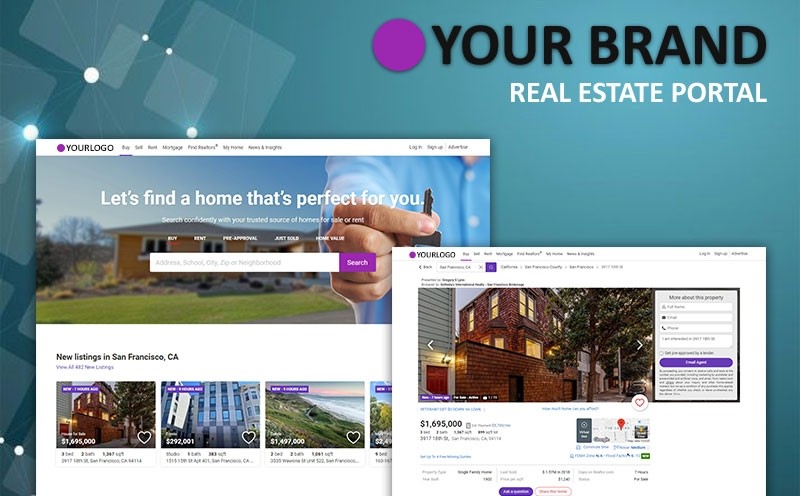
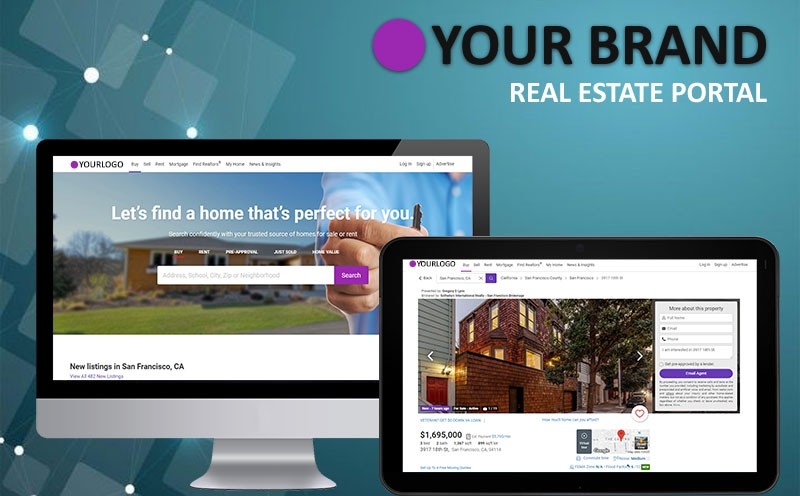
REAL ESTATE PORTAL 

USER VIEW

Sign up:

  • User can find the “Register” top of the website
  • User can register with a valid E-mail address and password
  • Confirmation mail sent to registered mail

Sign in:

  • User login with valid username and password
  • Forget password option also available in the login form
  • User can Re-set the password using Registered mail-Id

Home screen:

  • User can view various properties with the property name and property image
  • User can view the featured property list with details
  • User can search with google map
  • User can view agent details
  • User can view testimonials
  • User can view partners details
  • User having search property search engine

Properties:

  • User can view property with property media
  • Each property contains their details
  • User can view additional details of the property
  • User can view agent details
  • User can view agency details
  • User can post a report about the property
  • User can compare the property
  • User can post a review
  • User can view property location using Google map
  • User can view property agents
  • User can also request to the agent for property details
  • User can view contact details of the property
  • User can view property additional details

Search:

  • User can search property using location and type
  • User can search property by property ID
  • Properties are categories by the property type
  • User can view property in Google map

Agents:

  • User can view various agents with name and their details
  • User can view agents contact details like mobile, Email, and website
  • Each agents having their details
  • User can share agent details with social networks
  • User can post a request to the agent

Agency:

  • User can view various agency name and their details
  • User can view agency contact details like mobile, Email, and website
  • User can view agency location with Google map
  • Each agents having their details
  • User can share agent details with social networks
  • User can post a request to the agent

Membership plan:

  • User can view their current membership plan
  • User can upgrade their membership plan
  • Update through PayPal

Blog:

  • User can view various blogs with the blog title
  • Each blog contains its description and media
  • User can search blog with the blog name
  • User can post a comment in the blog

Create listing:

  • User can add a new property with detail
  • User can choose their type
  • User can select their package
  • User can enter the property location with Google map

Manage listing:

  • User can manage their listing details
  • User can search the property

Profile:

  • User can manage their profile detail
  • User can change their password

Newsletter:

  • User can signup for the newsletter
  • User get updation form the site through mail

CMS Page:

  • About us
  • Terms & Condition
  • Contact us
  • Social network connections

ADMIN VIEW

Login:

  • Admin can log in with a valid username and password
  • The form is validated with JQuery
  • Forget password option also available in the login form

Dashboard:

  • Admin can view comments and pages at a glance
  • Recently published posts can be view by the admin
  • Admin can take quick notes using quick draft

Properties management:

  • Admin can add and manage the property
  • Properties are filtered using date
  • Admin can search property using the search box
  • Admin can add and manage type for the property
  • Admin can add and manage status for the property
  • Admin can add and manage other info related to properties like furnished
  • Admin can add and manage location for the property

Agents:

  • Admin can add and manage agents
  • Agents are filtered using date
  • Admin can search agents with name

Posts:

  • All news posts are managed by the admin
  • Posts are filtered using date, category
  • Admin can search post using the search box
  • Admin can add and manage a new category for the post
  • Admin can add and manage new keyword for the post

Media:

  • All media are managed by the admin
  • Media are filtered using date
  • Admin can search for media using the search box

Pages:

  • All pages are managed by the admin
  • Pages are filtered using date and SEO Score
  • Admin can search pages using the search box

Communication form:

  • All forms are managed by the admin
  • Forms are filtered using type
  • Admin can search form using the search box

Comments:

  • All comments related with blogs are managed by the admin
  • Comments are filtered using type
  • Admin can search comments using the search box

Users:

  • Admin can manage user details
  • Users are filtered using role
  • Admin can search the user by name and Email

Settings:

  • Admin can manage
    • Site title
    • Site address
    • E-Mail Address
    • Time zone
    • Date and time format
    • Site language
    • Payment gateway
  • Admin can manage social network appearance size settings

Appearance:

  • PSM Settings
    • Admin can manage logo and favicon settings
    • Admin can manage background image and color settings
    • Admin manage layout settings
    • Admin manage social network connection settings
    • Admin manage Google map settings
    • Admin manage background image and color settings
    • Admin can manage font settings
    • Admin can manage advanced search fields
Read More
Tags (0)

Use spaces to separate tags. Use single quotes (') for phrases.

Reviews (0)

Write Your Own Review

You're reviewing: Real Estate Portal

How do you rate this product? *
 
1 1 star
2 2 star
3 3 star
4 4 star
5 5 star
Quality
Value
Price

Real Estate Portal

Regular Price: $3,769.00

Special Price $2,899.00


  • Free Technical Support
  • Mobile Responsive
  • Assured Quality Check
  • 24/5 Customer Care
  • One time payment
Purchase Now

-OR-


Item Information

License For use on any personal, commercial, or client projects.
Hosting Requirements MySQL 5.0 or higher, Apache module, PHP 5.3 or higher, Linux Server with Cpanel
Platform Wordpress 4.4
Coding PHP, MySQL, Javascript, Ajax ,HTML
Support 3 Months Free Support
Payment Type One time Payment
Delivery Time 30 Working Days

CUSTOMER SERVICE

  • My Account
  • Order History
  • Help Center
  • Investment Oppotunity
  • Partner With Us
  • Contact Us

DISCOVER DIGITALPRODUCT

  • About us
  • Blogs
  • Careers
  • Refund Policy
  • Terms & Conditions
  • Privacy Policy
  • Disclaimer

WHY CHOOSE US

  • Our experience
  • Our Approach
  • Our Unique Abilities
  • Committed to Quality
  • Quality of Code
  • Quality of Database Design
  • Dedicated Project Support Team
  • 24X5 Customer Support

© Posh Infosys Pty Ltd Australian Registered company ABN 38 647 192 836 ACN 647 192 836